


Tip 181: Publish a personal e-newspaper
The One Minute Tip

Brought me back to the good old days of working on the school newspaper. Create a Daily, Weekly or special edition newspaper of your very own custom content. paper.li

Tip 180: Fun with Aliases
The One Minute Tip

Aliases are symbolic links to original files, folders applications and Volumes. Here is a quick how-to-make and reclaim aliases. Making stuff easier to find.
Tip 179: Join.Me Screen Sharing
The One Minute Tip

Find yourself sending loads of screenshots to friends, family and clients? Lets step it up a notch and show them live with Join.me. A cool free way to share computer screens.
Tip 178: Quick file compression
The One Minute Tip
Even with the price of memory coming down and the size of hard disk drives going up. It never hurts to save a little space on your drive. Here is a quick and easy tip to compress files and folders in 2 steps.
Tip 177: Google Alerts
The One Minute Tip
Do you check the morning paper (Traditional or Electronic) every morning? Need more News? Try Google Alerts to receive news, videos, blog posts and events throughout the day.
Tip 176: Preview and Annotate
The One Minute Tip
Apple’s Preview.app has a great built-in Annotate feature. Use it to quickly add Arrows, Boxes, Circles and Text boxes to screenshots, PDF’s and other types of image files.
Tip 175: DropBox
The One Minute Tip
 Have you ever forgotten a file on your desktop or did not remember to update your usb drive before leaving home? Maybe you should try DropBox. A free web application you can use to sync your media with other computers and it works great with mobile devices.
Tip 174: More Spotlight Tricks
The One Minute Tip

Finding files is fast and easy with Spotlight. In this tip, a few more Spotlight tricks. Where the item is located, search by date and Privacy.
Sponsor: Visit gotomeeting.com, click the try it free button and
use promo code: Podcast
Tip 173: Google Fast Flip
The One Minute Tip

Do you miss the old days of browsing the Newspaper rack? Try Google Fast Flip, a visual way of scanning for your news. See covers of popular newspapers, magazines and blogs quickly. Then use your right and left arrow keys to navigate. Google Fast Flip
Tip 172: Really Deleting Files
The One Minute Tip
Are your deleted files really gone? Selling, donating or recycling your computer or hard disc drive? Here is one way to make sure all of your confidential files are deleted.
Sponsor: Hold your meetings online for just $49 a month. Try GoToMeeting free.
Tip 171: Instapaper
The One Minute Tip

Are your, to read later bookmarks, starting to pile up in your bookmark bar or on your desktop? With a few simple steps you could easily save and read these pages later, from any browser, anywhere. Use www.instapaper.com to add a Read Later button to your browser.
Sponsor: Hold your meetings online for just $49 a month. Try GoToMeeting free.
Tip 170: Emailing Safari
The One Minute Tip
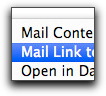
Here is a fast and easy way to email web pages or links using Safari. Under the File Menu and choose Mail Contents of This Page or Mail Link to This Page.
Sponsor: Hold your meetings online for just $49 a month. Try GoToMeeting free.
Tip 169: Google Maps and Bikes
The One Minute Tip
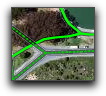
Google has added biking routes to google maps. Let the green lines show you the way. But remember, you can always drop and drag your own path. Google Maps Bike Routes
Tip 168: Locations in iPhoto 09
The One Minute Tip
Not all cameras have GPS. Here is how you can use Apples iPhoto 09 to add or modify location data to both photos and videos. Apples iPhoto
Tip 167: New Google Music Search
The One Minute Tip
In late October 2009, Google added music search. Now when you search an album, artists or lyrics, your top hits will include album art, music links and play preview buttons.
Tip 166: The Macintosh Dirty Button
The One Minute Tip
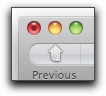
A dirty button can be found inside the close button of a document being edited. Save the document and the dirty button will disappear. A nice visual reminder to Save your file.
Tip 165: Opera Unite - Web Server and more.
The One Minute Tip
With Opera Unite you can quickly and easily set up a web server, media player, photo sharing, chat client and more, all with a few clicks of the mouse and the best part, its all runs from your computer. No special set-up required.
Warner Bros. HD-DVD to Blu Ray exchange
The One Minute Tip

Upgrade your Warner Bros. HD-DVDs for new BLU-RAY discs. www.red2blu.com
Tip 164: Large files and Mobile Me (www.me.com)
The One Minute Tip
Do you know the file size limit of your email service? How about the file size of your recipients service? With Apples Mobile Me www.me.com you store large files and sent email notification to friends, family or business associates. Large files fast and easy.
Tip 163: YouTube Educational Channel
The One Minute Tip

Want to turn that mindless video watching time into a fun and educational experience? Check out YouTubes Educational Channel at www.youtube.com/edu. And maybe pick up a quick lecture on Einsteins General Theory of Relativity or Minor Blues Chord Progressions in a Guitar Lesson.
Tip 162: Auto Quit Printer Icon in Apples Dock
The One Minute Tip
In Apples dock, the printer icon will remain after a printing session is completed. Here are the steps to Auto Quit the printer to remove it from the Dock after printing.
Tip 161: Coolest Webcam Trick
The One Minute Tip
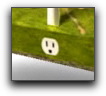
Want to see a cool webcam trick? Install the most current Flash Player plugin and turn on your printer. Then check out http://ge.ecomagination.com/site/ and select The "Smart Grid is closer than you think" link. Next choose the "Open the Door to the Smart Grid" button. Don't forget to blow into your microphone in the Wind Turbine demo.
You will have to see this to believe it.
Tip 160: Grand Central Phone Service
The One Minute Tip

Check out Grand Central, a cool web based phone service from Google. Here is a short feature list. Screen Callers - Listen In while a message is being recorded - Call Record - Block unwanted Callers - SMS and Email Notifications - Ring Different Phones - Custom Greetings - RingShare - WebCall Button - CallSwitch - Click2Call and even Mobile Access. You will never need another phone numbers again.
Wizzard TV on your iPhone or Touch
The One Minute Tip

Here is a fast and easy way to listen to the One Minute Tip on your Apple iPhone or iPod Touch. You can also use the iPhone/Touch icon located in the navigation bar to your right.
The One Minute Tip on your iPhone or iPod Touch
Thank you Wizzard TV!
Tip 159: Good Old FIND (Command+F)
The One Minute Tip
As hard disc drives increase in size. Finding content stored on them has also becomes more difficult. We have covered Spotlight in previous tips. But in this tip, lets take a look at good old FIND. This tip covers finds in the Finder. So choose the Command and F keys and off we go....
Tip 158: iTunes gift cards and shortcuts
The One Minute Tip
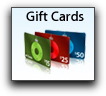
Maybe you received an iTunes gift card this holiday season? They were all the rage... Here are a few shortcuts to speed up your listening and viewing experience.
Tip 157: Drag and Drop Attachments in Apple Mail
The One Minute Tip
Drag and Drop works just about everywhere in the Macintosh environment. For example, you can instantly add an attachments to Apple Mail by just dragging items to its dock icon.
Tip 156: Cooliris browser plugin
The One Minute Tip
Tired of viewing the web the old fashion way. Try www.cooliris.com browser plugin for a cinematic look at the web. Discover, Shop, Search and Scroll. Works with Firefox, Safari and Internet Explorer.
Tip 155: Preserving web pages with PDF
The One Minute Tip
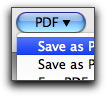
Here is a way to preserve web pages using Save as PDF with Apples print options (10.4 and newer)
Go To Meeting now with Full Macintosh support and Voice Over IP!
Tip 154: Securing Gmail with SSL
The One Minute Tip
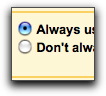
Google has added a new security feature to Gmail. Secure Sockets Layer (SSL) but you have to turn it on manually. Login to Gmail choose settings and check Always use https in the Browser connections options. This could cause Gmail to run a touch slower, but more secure.
Go To Meeting now with Full Macintosh support and Voice Over IP!
Tip 153: Keyboard your way through Google Maps
The One Minute Tip
This tip contains a quick rundown of keyboard shortcuts in Google Maps. For both the main map window and street view. You will learn how to zoom, pan, rotate, move (Drive) forwards and backwards.
Go To Meeting now with Full Macintosh support and Voice Over IP!
Tip 152: Parental Controls in 10.5
The One Minute Tip
Apple has updated Parental Controls in Leopard 10.5. Here is a quick rundown of its set-up and options.
Go To Meeting now with Full Macintosh support and Voice Over IP!
Tip 151: Buried Podcast Treasures at BBC World Service
The One Minute Tip

Just cant get enough world news? The BBC World Service Radio web page has links to many, if not all of the networks shows in podcast format. Search by station, genre or alphabetical Not enough hours in a day.
Go To Meeting now with Full Macintosh support and Voice Over IP!
Mac Roundtable #45
 Had a great time chatting with Adam Christianson: The MacCast,
Katie Floyd: The MacCore,
Don McAllister: ScreenCastsOnline,
Victor Cajiao: The Typical Mac User Podcast and Steve Stanger: The Mac Attack over at The Mac Roundtable show 45.
Had a great time chatting with Adam Christianson: The MacCast,
Katie Floyd: The MacCore,
Don McAllister: ScreenCastsOnline,
Victor Cajiao: The Typical Mac User Podcast and Steve Stanger: The Mac Attack over at The Mac Roundtable show 45. Tip 150: MobileMe - Galleries and Passwords
The One Minute Tip
Setting up a password for viewing MobileMe image galleries is a snap. All you need is a valid MobileMe account and iPhoto 7.1.4 or newer.
Go To Meeting now with Full Macintosh support and Voice Over IP!
The One Minute Tip
hosted by John Chambers
The One Minute Tip is a collection of short Podcasted technology tips, interviews, quickstarts and videos for people who don't have time to read manuals cover to cover.
Always worksafe
and family friendly!
Hope you enjoy the podcast.
One Minute Tip Network


Techpodcasts.com

Podcast Directories